HTML works locally but breaks after sharing: fix images, CSS, and fonts
Learn why images, CSS, fonts, and scripts disappear after an HTML file is shared, then make the result portable as one self-contained file.
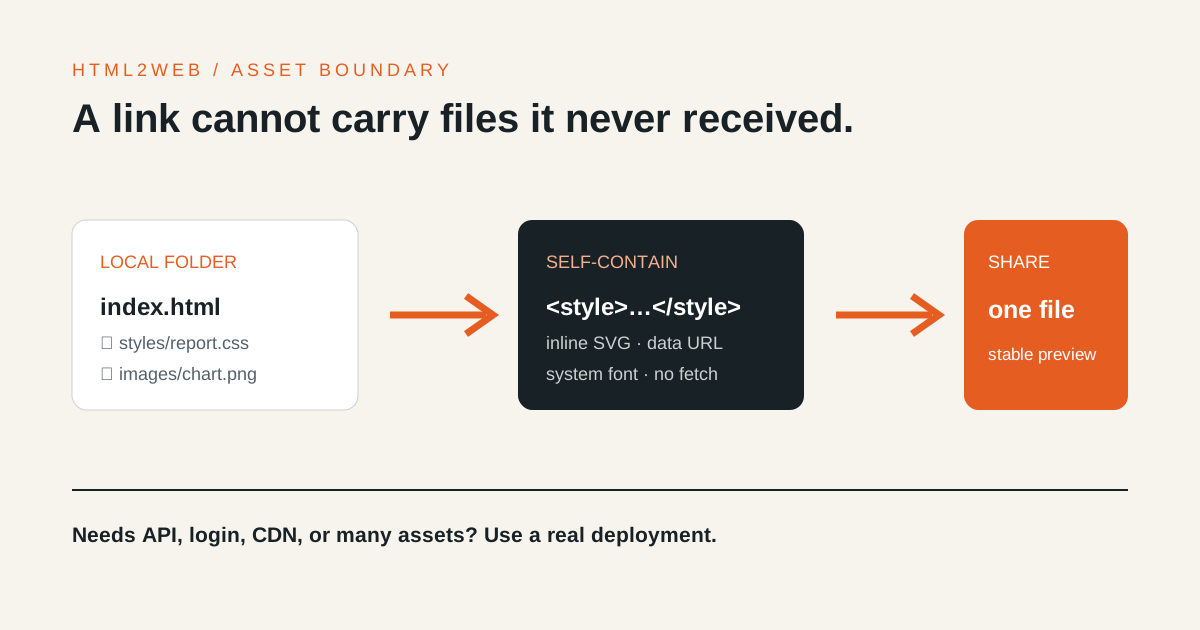
When an HTML file looks right on your computer but breaks after sharing, check file paths and external resources before blaming the browser. A single HTML upload cannot carry separate CSS, image, or font files, and a portable review link cannot reproduce every CDN or API dependency.
Check these three path patterns first
This markup works only while the original folder structure exists:
<link rel="stylesheet" href="./styles/report.css">
<img src="./images/chart.png" alt="Monthly usage chart">
<img src="file:///home/example-user/Desktop/logo.png" alt="Company logo">
Uploading only index.html does not upload styles/report.css or
images/chart.png. A file:/// URL points to the author’s computer, which a
recipient cannot access. A root-relative path such as /images/chart.png
assumes an existing website root and resolves somewhere else on a temporary
share URL.
As the WHATWG URL Standard defines, a relative URL is resolved against a base URL. Moving the document from a local folder to a public address changes that base.
What belongs inside a self-contained HTML file
Move required CSS into <style>
Keep the styles needed to read and review the result inside the document:
<style>
  :root { color-scheme: light dark; }
  body { margin: 0; font-family: system-ui, sans-serif; }
  img { max-width: 100%; height: auto; }
</style>
The goal is a result that does not depend on a Tailwind CDN or a separate build
output. If you already have compiled CSS, copy the necessary output into
<style> rather than retaining a link to the local bundle.
Convert small images to data URLs or inline SVG
Inline SVG works well for icons and simple charts. Small PNG and JPEG files can
use data: URLs, but base64 encoding increases the document size. A report with
many large photographs or downloads belongs on static hosting that can serve a
real asset directory.
Prefer system fonts
Google Fonts and other remote font files depend on a network request and the
recipient’s environment. Start with system-ui, sans-serif, serif, or
monospace for a review document that should open consistently.
When the layout appears but the script does not work
HTML2WEB runs shared HTML in an isolated frame. Inline JavaScript can run, but
external scripts, fetch, iframes, and form submissions that depend on another
network or browsing context are restricted. That boundary keeps shared code
separate from the host application; it is not a full application runtime.
Use normal application hosting when the result requires any of these:
- live data from an API;
- login, cookies, payment, or form submission;
- several JavaScript modules and asset files;
- a remote chart, map, script, or font CDN.
Two-minute portability check
- No
file://,C:\, or/Users/path remains. - Every
src="./...",href="./...", and CSSurl(...)has been resolved. - Essential CSS is inline and the page remains readable without a webfont.
- Images are embedded, or their information is also available as text.
- The main interaction works without remote scripts or API calls.
- The share URL has been opened at desktop and mobile widths.
Upload the repaired document to the HTML-to-URL tool, then open the result in a private window and on a phone. If the document still needs an asset tree or backend, use the sharing, conversion, and deployment guide to move it to maintained hosting.