HTML2WEB vs GitHub Pages, Cloudflare Pages, and Vercel for one HTML file
Compare HTML2WEB with GitHub Pages, Cloudflare Pages, and Vercel for a single HTML file by setup states, URL lifetime, indexing, and ownership.
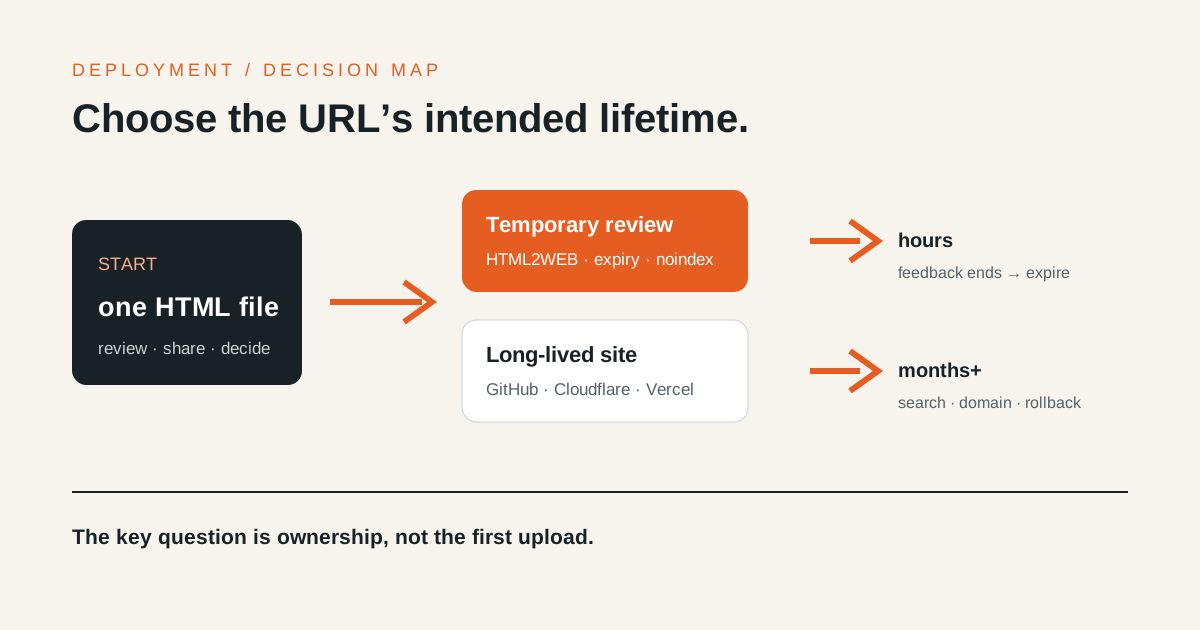
You do not need a repository and deployment project for an HTML file that only needs a short review. You do need maintained hosting when the URL must be indexed, use a stable domain, include multiple assets, or retain deployment and rollback history. The deciding factor is not raw speed. It is how long the URL must live and who will operate it.
Pick the outcome first
| Situation | Start with |
|---|---|
| A meeting, code review, or client draft that lasts hours | HTML2WEB |
| Public documentation or a portfolio maintained in Git | GitHub Pages |
| Git deployments, branch previews, and Cloudflare operations | Cloudflare Pages |
| A frontend app managed through preview and production deployments | Vercel |
All four produce browser URLs, but they make different promises. HTML2WEB is a temporary review surface for one artifact. The other three manage the ongoing deployment of a project.
The same index.html requires different setup states
Account access, organization approval, and DNS permissions can dominate setup time, so a universal “seconds” figure would be misleading. The comparison below uses the states that must exist before the first public URL can be verified.
HTML2WEB: from file to review URL
- Open
index.htmlor copy its source. - Drop or paste it into the HTML-to-URL tool.
- Choose expiry and an optional password.
- Publish and receive the URL.
- Verify it in a private window before sending it.
The anonymous free path needs no repository or sign-up before the first publish. Its boundary is one HTML or Markdown file, 1MB, and a 30-minute, one-hour, or 24-hour expiry.
GitHub Pages: the repository is the published source
- Create or choose a GitHub repository.
- Commit
index.htmland its assets. - Select a Pages source or a GitHub Actions workflow.
- Push to the configured branch and inspect deployment status.
- Verify the generated URL, paths, and optional custom domain.
The current GitHub Pages limits describe a maintained static site with size, build, and usage boundaries. GitHub also says Pages is not intended as free hosting for an online business or SaaS, or for sensitive transactions.
Cloudflare Pages: connect Git and manage branch deployments
- Prepare a GitHub or GitLab repository.
- Authorize repository access and create a Pages project.
- Confirm the build command, output directory, and environment.
- Select the production branch and run the first deployment.
- Verify branch or PR previews and the production URL.
The Cloudflare Pages Git integration deploys on branch pushes and provides PR preview URLs and repository status checks. That workflow pays off when a team will deploy repeatedly.
Vercel: operate preview and production lifecycles
- Import a supported Git repository or link a CLI project.
- Confirm the project name, root, build output, and environment variables.
- Run the first deployment.
- Review branch and PR preview URLs.
- Operate the production branch, domains, and rollback path.
Vercel’s Git deployment documentation explains that branch pushes and pull requests create previews while the production branch drives production deployments. A single file can be deployed, but the larger benefit appears when an app needs an owned deployment lifecycle.
Compare operating responsibility, not just features
| Criterion | HTML2WEB | GitHub Pages | Cloudflare Pages | Vercel |
|---|---|---|---|---|
| Source | One HTML or Markdown artifact | Git repository | Git repository and build output | Git project and build output |
| Default lifetime | Automatic expiry | Operated until removal | Operated until removal | Operated under deployment retention |
| Search | Shares are noindex |
Depends on site configuration | Depends on site configuration | Depends on site configuration |
| Multiple assets | Single-file workflow | Supported | Supported | Supported |
| Changes | Private management link | Git commits | Git commits and deployments | Git commits and deployments |
| Best fit | One-off review | Public static site | Static site plus edge operations | Frontend app and previews |
Prices and plan limits change. Check each official source and your current plan before committing. The durable distinction is whether you have a disposable artifact or a project your team must own.
A password requirement may change the architecture
HTML2WEB can add a server-enforced password to a short external review. A JavaScript password prompt placed on a public static page is not server access control. If you need workspace identity, per-user permissions, and audit logs, choose an application architecture that supports authentication.
See the password, expiry, and noindex comparison for the exact boundary of each temporary-sharing control.
A simple decision rule
- One file, feedback, then expiry → HTML2WEB
- A durable and indexable URL → maintained static hosting
- Git changes with a preview for every PR → Pages or Vercel
- Forms, authentication, data, and long-term monitoring → an application deployment
For the broader difference between attachment, URL conversion, temporary sharing, and production hosting, read the HTML sharing and deployment guide. Choosing lifecycle before platform prevents both over-deploying a disposable file and running a production page on a temporary URL.