Before you share HTML: a three-minute check for API keys and personal data
Inspect source, hidden data, local paths, and request examples for API keys and personal information before turning an AI-generated HTML report into a link.
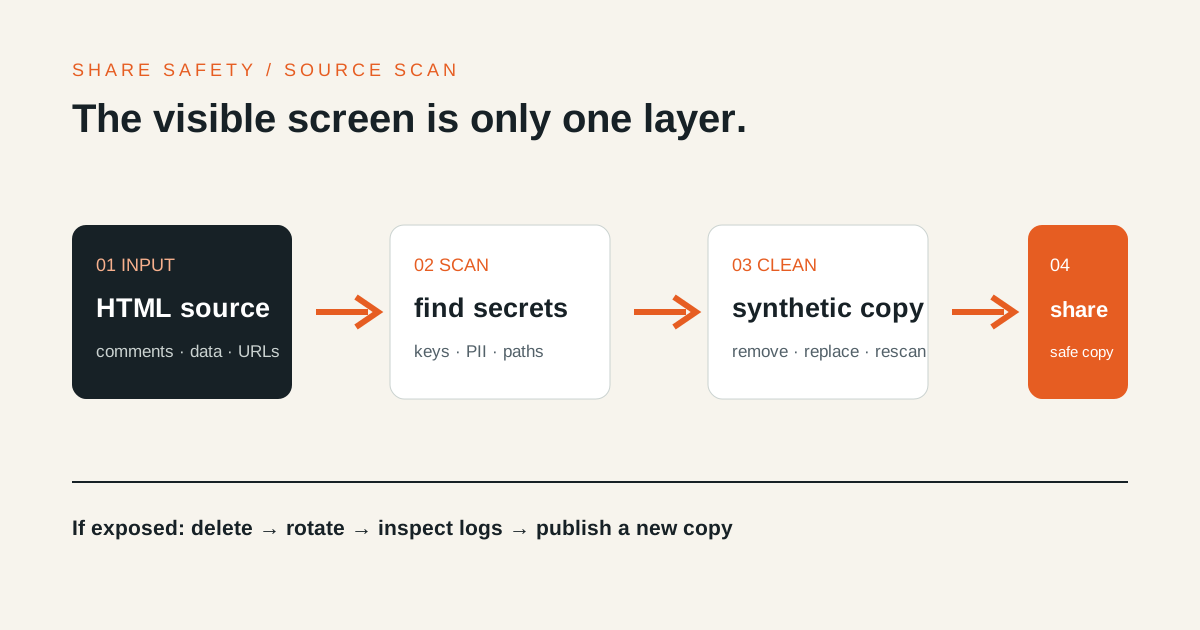
Before turning HTML into a link, inspect the entire source, not only the rendered screen. API keys and personal data in comments, hidden elements, JavaScript objects, and sample request headers remain part of the published file. Passwords and short expiry times reduce access; they do not make unsafe source safe to publish.
1. Search for credential-shaped strings
Start with a whole-file search for terms and patterns such as:
api_key
apikey
secret
token
password
Authorization:
Bearer
BEGIN PRIVATE KEY
sk-
ghp_
AIza
This is not a complete detector. Add the prefixes and environment-variable names used by your own services. GitHub’s secret scanning documentation distinguishes supported secret patterns from broader password detection. A clean automated scan is useful evidence, not proof that every sensitive value is gone.
As the OpenAI API key safety guide explains, an API key should not be deployed in browser code. If a public demo must call an API, keep the credential behind a backend with authentication and usage controls instead of embedding it in the HTML.
2. Read the HTML that the screen does not show
These locations are published even when they are not visible:
- notes and temporary data inside
<!-- comments -->; display:none,hidden, or collapsed dialog content;- raw data in
<script type="application/json">; - JavaScript variables, error messages, sample requests, and responses;
data-*attributes, source map URLs, and analytics identifiers;- image
alttext, linkhrefvalues, and form defaults.
Remove development notes from the sharing copy. Hiding a value with CSS is not the same as deleting it.
3. Check information that identifies people or organisations
The following may not be credentials, but they still need an explicit sharing decision:
- names, personal email addresses, phone numbers, addresses, and account IDs;
- customer names, project names, contract values, and internal dates;
- real employee, applicant, patient, or user records;
- internal hostnames, private IPs, ticket links, and repository paths;
- local paths such as
/Users/name/orC:\Users\name\; - tokens or document IDs left in URL queries and fragments.
Replace examples with synthetic data created for publication, not a lightly masked copy of the real record. Use reserved example domains and documentation IP ranges, then check that no real value remains mixed into the sample.
4. Create a separate sharing copy
Reduce a copy of the original in this order:
- Delete sensitive sections and comments.
- Replace real data with the smallest useful synthetic example.
- Remove scripts, network requests, and analytics that the review does not need.
- Run the whole-file search again.
- Open the file as text and read it from beginning to end.
- Open the share in a private window and inspect its source and network activity.
A team can add secret scanning to CI or a pre-commit hook. Human review still has to cover personal data and business context that do not match a known token pattern.
5. If the file is already online, do more than delete it
If an API key or token may have been exposed:
- Delete the share from its private management link.
- Revoke or rotate the credential at its provider.
- Review access, usage, and unexpected billing.
- Publish the sanitised copy at a new URL.
- Tell recipients that the old URL and credential were replaced.
Deletion prevents future access through the share. It cannot erase a saved copy or invalidate a credential by itself. Follow the rotation and revocation process in the OWASP Secrets Management guidance.
Only then use the HTML-to-URL tool. If the audience also needs an access boundary, compare passwords, expiry, and noindex, but do not use those controls as a substitute for cleaning the source.